3ds Max Explode Geometry Plugin
liveAn ADN sample plug-in that splits mesh faces into individual objects — I maintain the modern Python/pymxs port, docs, and annual 3ds Max release updates.
What it does
Explode Geometry is a 3ds Max plug-in that turns selected mesh geometry into one object per face — useful for per-face animation, destruction setups, and mesh cleanup. It ships as both a .NET plug-in (App Bundle / App Store) and a Python script using pymxs.
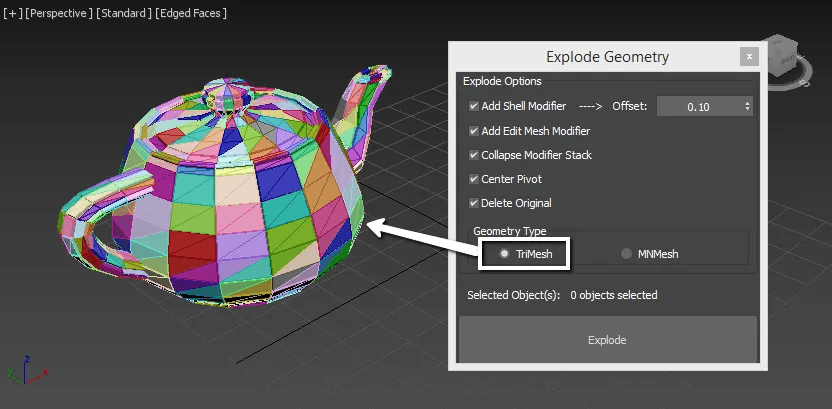
- Select nodes, pick tri or quad output, and explode each face into its own object
- Optional mesh conversion before exploding, with progress feedback and cancel support
- Post-process toggles: Shell modifier, Edit Mesh, collapse stack, center pivot, delete originals
- Python port: PySide6 UI, progress panel, debug logging, and timing feedback in the Listener
Why I built it
The original .NET sample is a long-lived ADN reference, but studios increasingly want scriptable, Python-first workflows. Keeping a pymxs port in sync — and the whole project current across annual 3ds Max SDK, runtime, and menu-system changes — makes the sample actually usable year after year.
How it works
- Original plug-in: .NET C# sample with App Bundle packaging and App Store menu integration
- Python port: migrated from legacy MaxPlus APIs to pymxs + PySide6 (3ds Max 2022+, best on 2026/2027)
- Maintenance: annual release updates — e.g. .NET Core 8.0 for 2026, .NET 10.0 for 2027, GUID-based App Store menus from 2025 onward
- Docs & samples: README, help assets, MaxScript menu setup, and a runnable Python/explode_geometry.py reference script
What I learned
Porting a mature MaxPlus script to pymxs is less about one-to-one API swaps and more about rethinking UI, progress, and scene-graph access in the modern Python host — then keeping that port aligned with a separate .NET binary through yearly Max churn.